Boost Efficiency: 7 Essential ComfyUI Shortcuts (Beginner-Friendly)


Master these core shortcuts to build workflows faster. Focus on creation—no complex commands needed:
1. Canvas Navigation 🗺️
Move canvas (view off-screen nodes):
- Hold
Spacebar+ Drag mouse - Or Hold left-click in blank area + Drag
Zoom canvas:
- Scroll forward → Zoom in (examine details)
- Scroll backward → Zoom out (overview layout)
2. Node Editing ✂️
Copy single node:
- Select node →
Ctrl+C→Ctrl+V(basic paste) Ctrl+Shift+V(paste with connections)
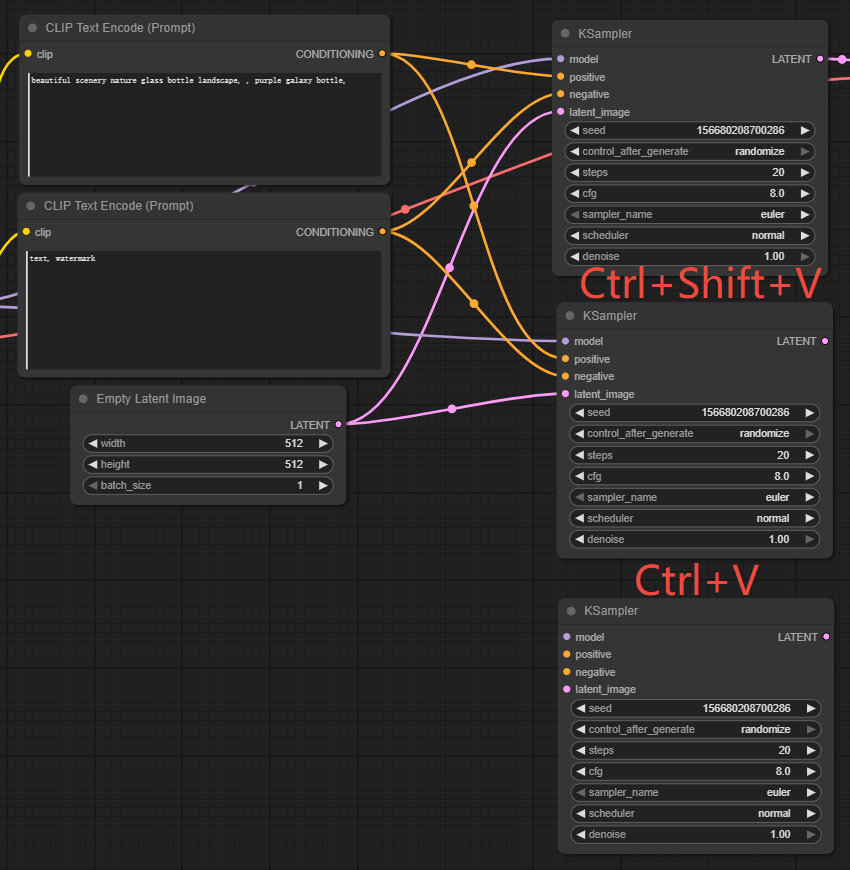
Delete node:
- Select node → Press
DeleteorBackspace
3. Batch Operations 🧰
Multi-select nodes:
- Hold
Ctrl+ Click nodes - Or Hold
Ctrl+ Drag selection box - Select all:
Ctrl+A
Move multiple nodes:
- Multi-select → Hold
Shift+ Drag any node
4. Instant Node Addition 🔍
Open search panel:
- Double-click blank area → Type node name (e.g., "LoRA Loader") → Click to add

Pro Tips:
- Messy interface? Click mouse wheel to reset canvas.
- Mistake?
Ctrl+Zto undo.
Unlock Full-Powered AI Creation!
Experience ComfyUI online instantly:
https://market.cephalon.ai/share/register-landing?invite_id=RS3EwW
Join our global creator community:
https://discord.gg/MSEkCDfNSW
Collaborate with creators worldwide & get real-time admin support.