ComfyUI Practical Guide: Using the MLSD and Depth Preprocessors


In ComfyUI, preprocessors play a key role in controlling how your images are generated. This article introduces two commonly used ones—MLSD and Depth—and walks you through real examples to help you get started quickly.
Whether you’re new to ComfyUI or looking to optimize your workflow, these tips will help you create more efficiently and with greater control.
1. MLSD Preprocessor: The Straight-Line Extraction Specialist
The MLSD (M-LSD) Preprocessor is designed to extract straight-line edges from an image.
It identifies and preserves linear features while ignoring curves—perfect for tasks that require precise geometric boundaries, such as architectural design, interior decoration, and engineering drawings.
2. Understanding the MLSD Preprocessor Node
ComfyUI includes one MLSD-related node:
“M-LSD Line Segment Preprocessor.”
This node provides two main parameters:
- Score Threshold (0–2): Controls the strength of line detection. The higher the value, the fewer lines will be kept.
- Distance Threshold (0–20): Filters out lines that are too short, keeping only longer segments.
3. Practical Example: From Empty Room to Finished Interior
Here’s a simple walkthrough to help you use MLSD in practice:
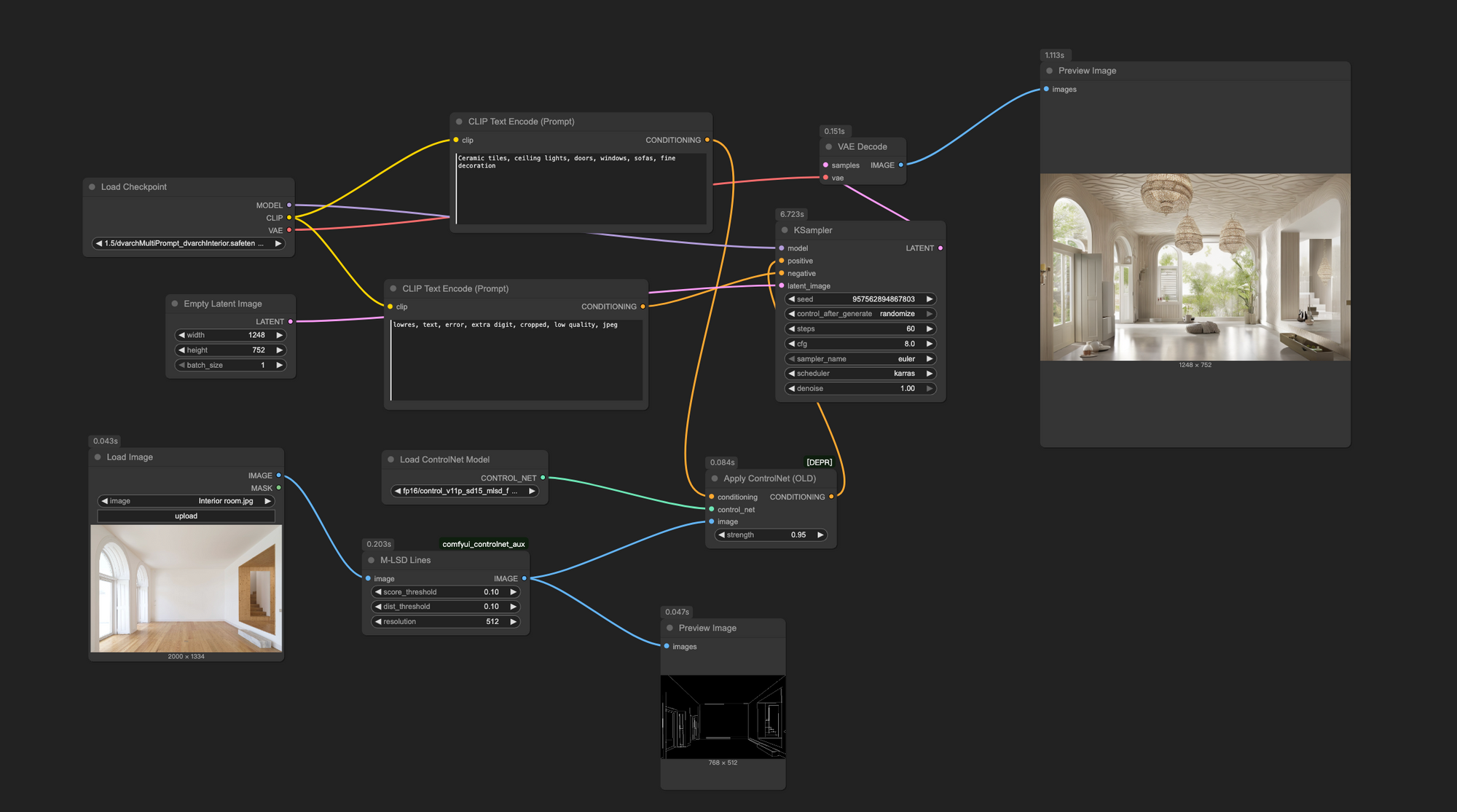
- Open ComfyUI and load a text-to-image workflow. Add the “M-LSD Line Segment Preprocessor” node. Connect it to “Load Image” and “Preview Image,” then upload a raw interior photo.
- Create “ControlNet Apply” and “ControlNet Loader” nodes. In the loader, select the model:
control_v11p_sd15_mlsd_fp16.safetensors, and link the image output to the MLSD node. - Connect the “Condition” port from ControlNet Apply between the CLIP Text Encoder and the K Sampler.
- Load a suitable checkpoint model, for example:
Interior_ModernStyle_Fine_2.0.safetensors. - Enter prompts:
- Positive prompt:
Ceramic tiles, ceiling lights, doors, windows, sofas, fine decoration - Negative prompt:
lowres, text, error, extra digit, cropped, low quality, jpeg
6. Set parameters:
- MLSD Score Threshold and Distance Threshold = 0.1
- Resolution = 512
- ControlNet Strength = 1
7. In the Empty Latent node, set output size to 512×512 and batch = 1.
8. Configure K Sampler: seed = 0, steps = 25, CFG = 7, sampler = dpmpp_2m, scheduler = karras, denoise = 1.
9. Click “Add Prompt Queue” to generate the image.
After completing these steps, you’ll see how MLSD extracts clean structural lines from the raw photo, providing a solid base for refined interior design generation.
4. Depth Preprocessor: Controlling 3D Depth and Perspective
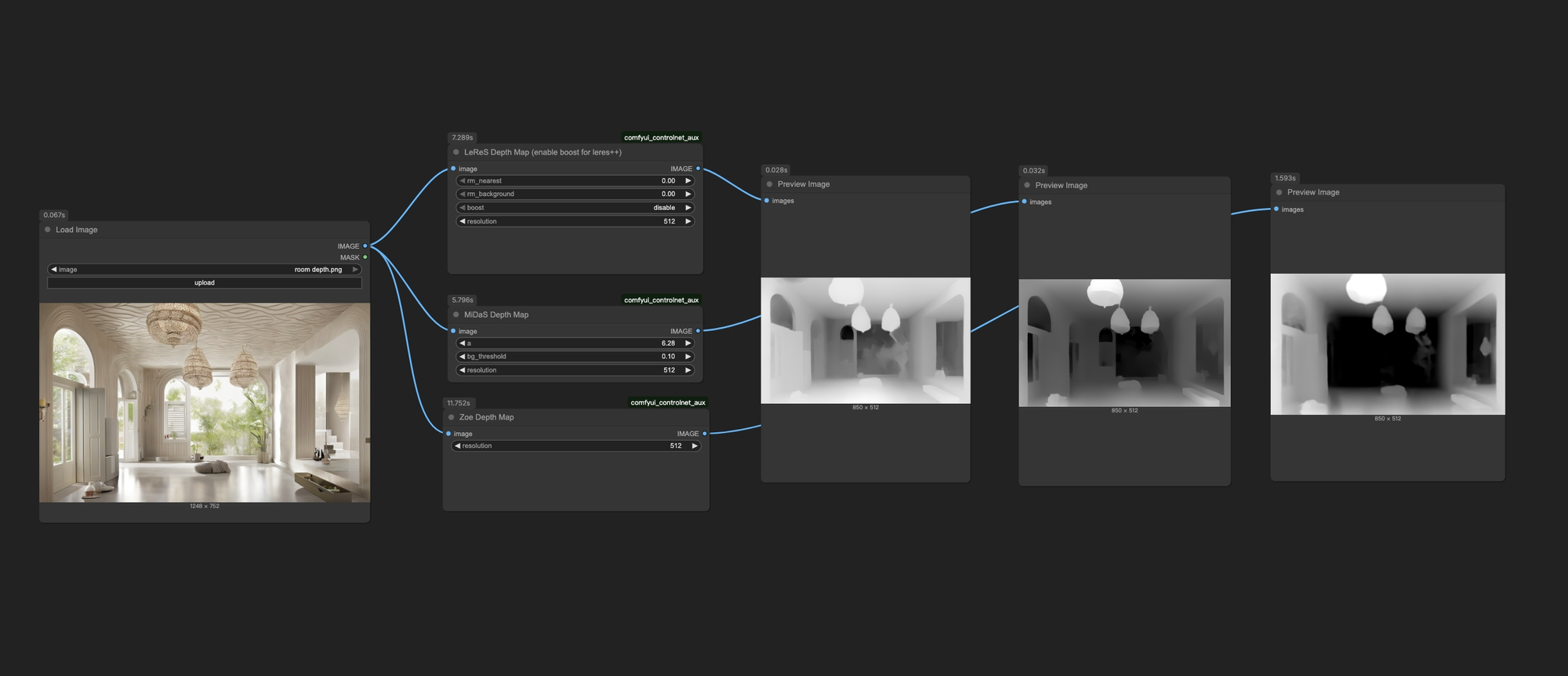
The Depth Preprocessor generates a depth map from an image, showing the distance of objects in grayscale—the closer an object is, the lighter it appears; the farther it is, the darker.
It’s particularly useful for managing foreground and background relationships and enhancing the spatial depth of generated images.
5. Choosing a Depth Preprocessor Node
ComfyUI offers three Depth preprocessors, each suited to different needs:
- LeReS Depth Preprocessor: Allows foreground/background removal. The “Enhance” option strengthens edge details and mid-range object separation.
- MiDaS Depth Preprocessor: The default option. Adjust the “Angle” for better depth interpretation from different viewpoints; “Background Threshold” separates foreground and background.
- Zoe Depth Preprocessor: Balances detail and stability, sitting between LeReS and MiDaS—ideal for general use.
Conclusion
The MLSD and Depth preprocessors are powerful tools within ComfyUI that give you greater control over geometric structure and 3D composition.
By fine-tuning their parameters and combining them with the right models, you can easily move from basic outlines to complex visual designs.
Experiment with these tools in different projects—you’ll find endless creative possibilities waiting to be explored
Unlock Full-Powered AI Creation!
Experience ComfyUI online instantly:
https://market.cephalon.ai/share/register-landing?invite_id=RS3EwW
Join our global creator community:
https://discord.gg/MSEkCDfNSW
Collaborate with creators worldwide & get real-time admin support.