Efficency-nodes Extend Guide: Simplify Your AI Image Workflows


ComfyUI is flexible but gets cluttered with repetitive node connections. The Efficiency-nodes extension fixes this by packing multiple functions into 2 core node types (loaders + samplers), cutting workflow complexity and saving time. It also adds features like HD restoration and XY parameter comparison charts.
Key Nodes in Efficiency-nodes
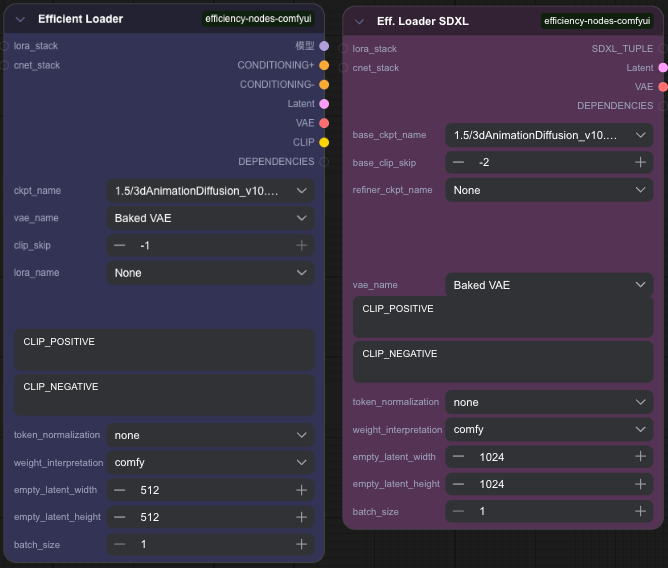
Efficiency Loaders
- What it does: Combines 6+ standard nodes (Checkpoint loader, CLIP encoder, Latent, VAE, prompts) into 1 node.
- Variants: "Efficiency Loader" (basic) + "Efficiency Loader (SDXL)" (for SDXL models).
- Extras: Supports LoRA/ControlNet stacking (easily add multiple LoRAs/ControlNets without messy wiring).
Efficiency Samplers
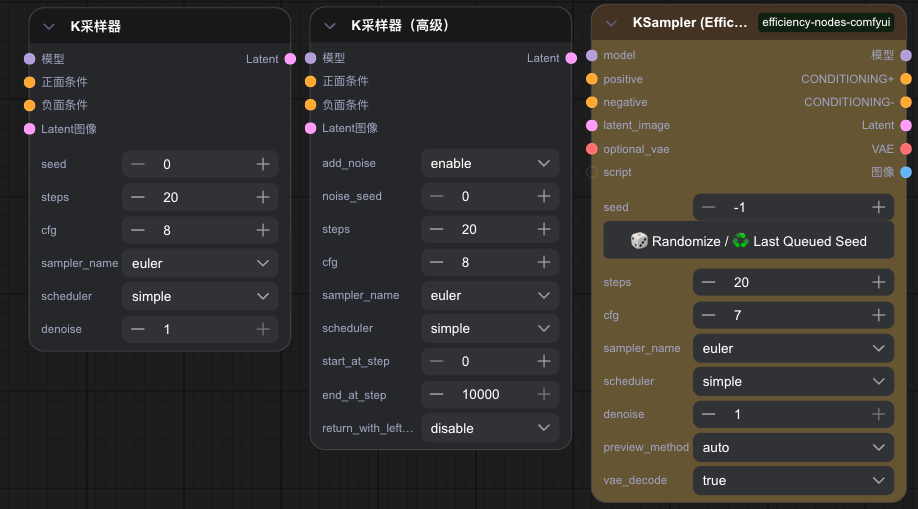
- What it does: An upgraded K Sampler with built-in VAE decoding + real-time preview (no extra "Preview Image" node needed).
- Variants: "K Sampler (Efficiency)" (basic), "Advanced Efficiency" (more controls), "SDXL Efficiency" (for SDXL).
- Extras: Works with scripts (e.g., HD upscaling) via a "Script" input port.
Quick Guide: Use Efficiency’s XY Chart
The XY Chart helps test 2 parameters (e.g., steps + samplers) at once. Here’s how:
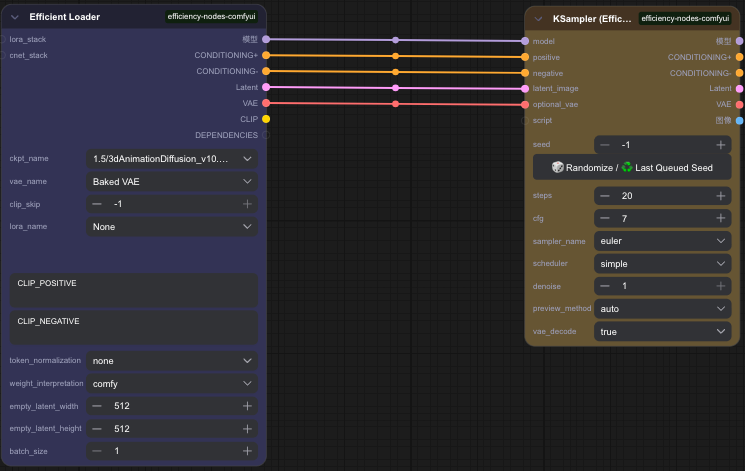
Set up the base workflow
- Add "Efficiency Loader" (set model/VAE/prompts) + "K Sampler (Efficiency)" (keep default).
- Connect their ports.
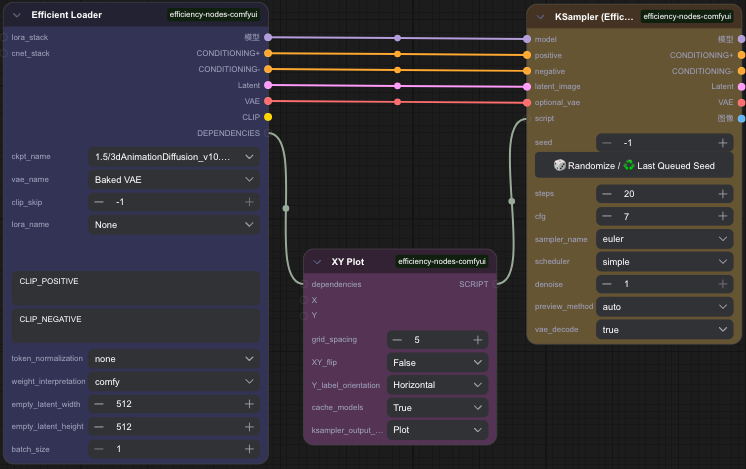
Add the XY Chart node
- Link "Efficiency Loader"’s "Dependency" output to XY Chart’s "Dependency" input.
- Link XY Chart’s "Script" output to the sampler’s "Script" input.
- Set "Spacing" (image gap) to 5; set "Image Output" to "Plot".
Add parameter nodes
- Add "Steps" node: Set "Count=4", "Start Step=5", "End Step=20" (test 5/10/15/20 steps).
- Add "Sampler Scheduler" node: Set "Input Count=4", pick 4 samplers (e.g., euler, dpm_sde, dpmpp_2m, lcm).
- Link "Steps" to XY Chart’s X input; link "Sampler Scheduler" to XY Chart’s Y input.
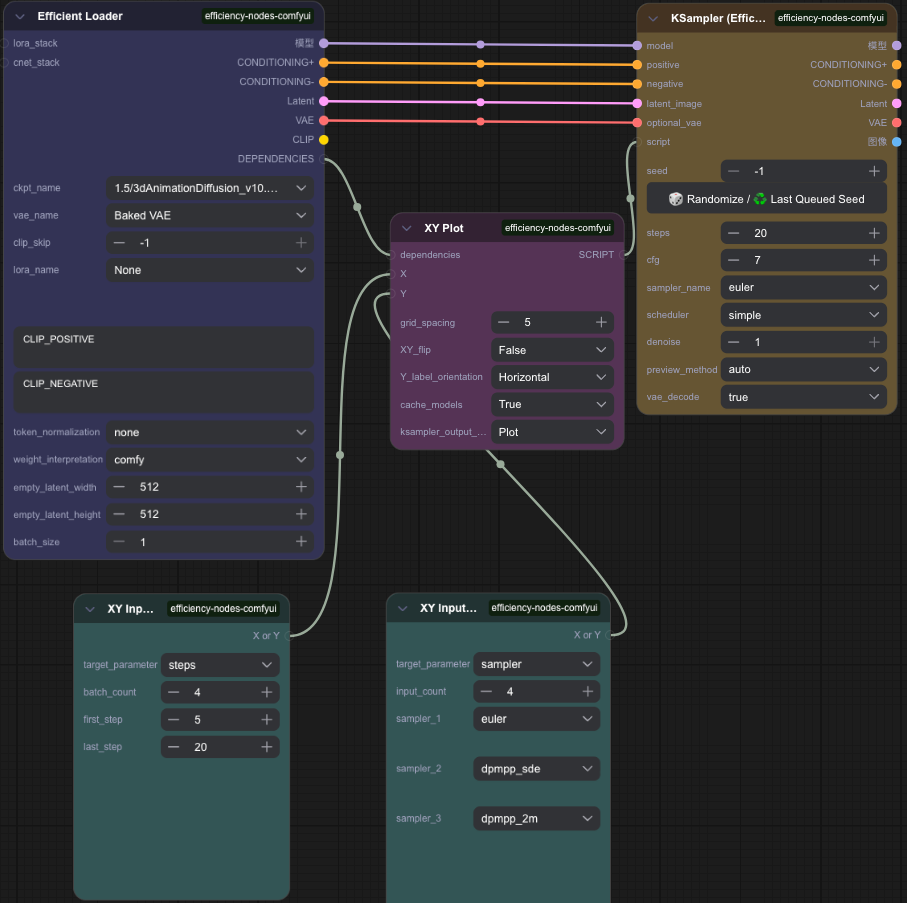
Generate & compare
- Click "Add Prompt to Queue" — the XY chart will show results for all parameter combinations.
Unlock Full-Powered AI Creation!
Experience ComfyUI online instantly:👉 https://market.cephalon.ai/aigc
Join our global creator community:👉 https://discord.gg/KeRrXtDfjt
Collaborate with creators worldwide & get real-time admin support.