Understanding and Using SD Base Models


When starting your AI art journey in ComfyUI, the first and most crucial choice you'll encounter is selecting the Base Model (often called the "checkpoint" or "large model"). Positioned at the very beginning of a typical workflow, its placement alone hints at its fundamental role.
What is a Base Model? Think of It as the AI's "Artistic Brain"
You can think of a base model as the AI's "knowledge repository" and "artistic style amalgamation"—the result of extensive training on massive datasets. It doesn't store thousands of images itself; instead, it contains the visual patterns and artistic principles distilled from that data.Because they encapsulate vast amounts of learned information, base model files are typically very large. Current mainstream models, often based on architectures like SD 1.5 or SDXL, usually range from around 2GB to over 7GB in size—a direct reflection of the "knowledge" they contain.
Why Do You Need Multiple Models? It's Like Hiring Different Specialist Artists
Once you understand that a base model represents a specific set of styles and capabilities, it becomes clear why no single model can do everything perfectly.
- Specializations Vary: Some models are specifically trained to excel at creating photorealistic portraits, while others shine in producing anime-style artwork. You'll find specialists in architectural visualizations, fantasy landscapes, and more.
- Choose the Right Tool: This is why many AI creators build extensive libraries of different base models. It's akin to hiring a portrait painter for a portrait and a cartoonist for a comic—in ComfyUI, you select the most suitable "specialist artist" (base model) for your specific creative task.
A Key Difference Between SD and Midjourney: Open Ecosystem vs. Unified Service
This distinction is crucial for understanding the SD ecosystem:
- Midjourney operates more like a single, highly capable "master artist" with a consistent style. You guide this artist with prompts but cannot fundamentally change its core approach.
- Stable Diffusion (via ComfyUI), in contrast, provides you with an open studio filled with diverse "artist brains" (base models), each with unique specialties. You have the freedom to choose which artist works for you, or even combine their talents.
See the Difference: A Practical Demonstration
The best way to grasp the impact of a base model is through comparison. Using the exact same prompt and generation settings while only swapping the base model will yield strikingly different results.
For instance, if you use a base model specifically trained for realistic portraits (like majicmixRealistic), even a simple prompt can produce a figure with convincing skin textures and lifelike lighting. Feed that same prompt into an anime-style model, and the output will be entirely different in character.
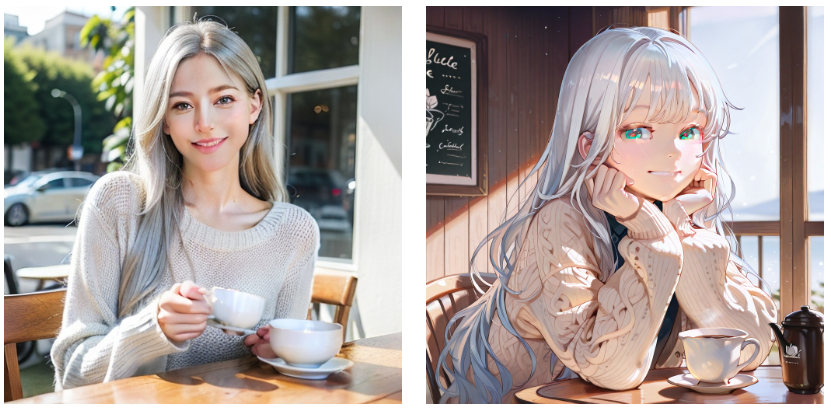
The Key Takeaway: Selecting a base model aligned with your desired artistic style is the first—and most critical—step toward successfully generating your envisioned image.
Unlock Full-Powered AI Creation!
Experience ComfyUI online instantly:
https://market.cephalon.ai/share/register-landing?invite_id=RS3EwW
Join our global creator community:
https://discord.gg/MSEkCDfNSW
Collaborate with creators worldwide & get real-time admin support.